Pop’s Space-A Travel Blog

Get Space-A flight alerts on your phone

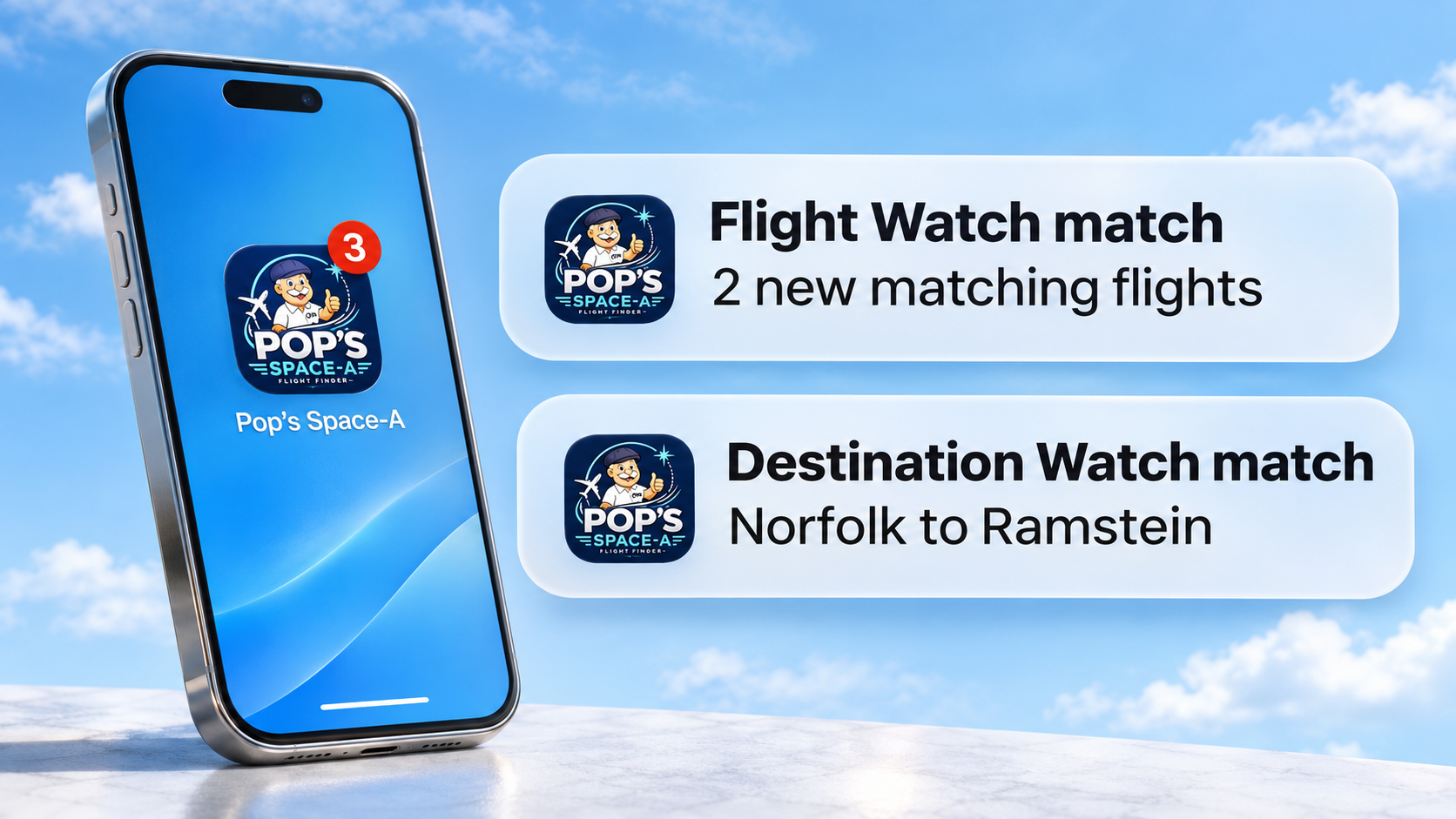
Phone showing the Pop's Space-A app with Flight Watch and Destination Watch alerts, including Norfolk to Ramstein

Waiting for a Space-A flight from Norfolk to Ramstein? Save that route in Pop’s Space-A and your phone can let you know when a matching flight shows up. If that flight changes, you’ll get a notification about the change, too.

You can watch a specific route with Route Watch or save a destination with Destination Watch. Route Watch was previously called Flight Watch. So if you’re set on flying out of Norfolk, save Norfolk to Ramstein. If Ramstein is the goal and you’re flexible about where you leave from, save Ramstein as your destination.

How to get started

To receive phone notifications, you’ll need to download the free Pop’s Space-A Flight Finder app.

  1. Open the Pop’s Space-A app on your phone.
  2. Save a route in Route Watch or a destination in Destination Watch.
  3. Allow notifications when your phone asks. If you’ve already turned them off, you can enable them in your phone’s notification settings.

Once you’re set up, Pop’s will notify you when it finds a matching flight and when a matching flight changes. When an alert comes in, open the app to see what was posted or what changed.

Have a trip in mind? Save it in Pop’s Space-A today. Phone alerts are free.

Pop’s Trip Report: Print Your Terminal Info Before You Fly

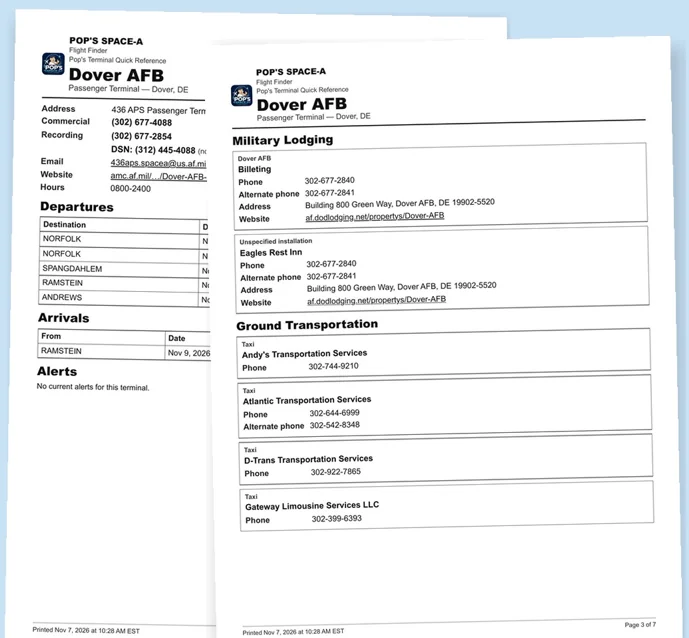
Printed Pop’s Terminal Quick Reference pages for Dover AFB, with departures, lodging, and ground transportation

Heading out on Space-A? Stop relying on your phone battery, spotty terminal Wi-Fi, or last-minute searches.

Pop’s Trip Report is a clean, print-ready packet for any AMC terminal. Open the terminal page on Pop’s, hit print, and walk out with everything you need in one place.

What’s included (Dover example)

  • Current departures and arrivals with roll-call times
  • Terminal address, commercial/DSN phones, email, hours, and official site
  • Base map
  • Military lodging options with phones and addresses
  • Ground transportation (taxis, rental cars, bus/rail, nearby airports)
  • Other useful numbers (Red Cross, BX, Commissary, Security Forces, USO, Visitor Center, and more)

No account required. Always free.

Print it, fold it, and you’re ready.

Pop’s Space-A Now Has News: Catch Up on What’s Happening Around Your Next Stop

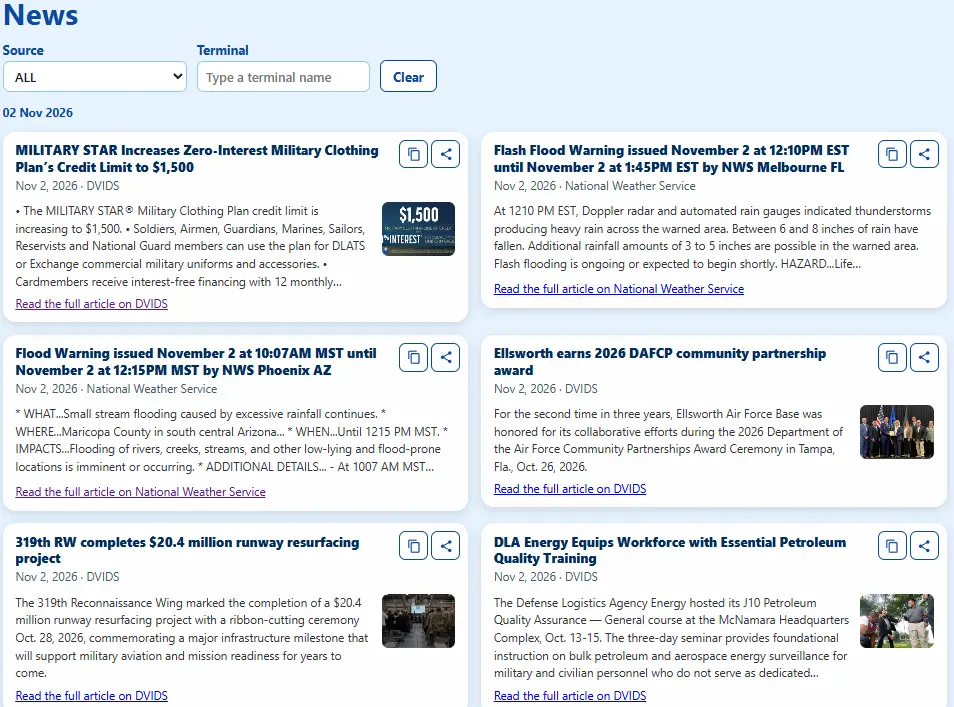
News page with source and terminal filters and story cards

Checking flight schedules is an important part of planning a Space-A trip. But there’s more to a destination than the next available flight. What’s happening on base? Are there local updates worth reading? What stories are coming out of the military community?

The new Pop’s Space-A News page brings military and base headlines, weather notices, and other updates together in one place. You can browse the broader news feed or narrow it down to the sources and terminals that interest you.

Browse the Headlines Your Way

You don’t have to be planning a trip to use the News page. Open it whenever you want to catch up on military and installation news.

Stories include the publisher’s name and publication date, along with a brief summary when available. Follow the article link to read the full story on the original publisher’s website.

Pop’s helps you find the story, while keeping the full article—and credit—with the people who published it.

Find News Related to a Terminal

If you’re researching a particular departure point or destination, use the Terminal filter to narrow the feed.

Start typing a terminal name and choose the matching location. This helps you find related coverage without scrolling through every headline in the broader feed.

For example, if Ramstein is part of your travel plans, you can look for stories associated with that terminal. You can also check other possible stops as you compare your options.

The available coverage will vary by terminal. A location with fewer matching stories may have a shorter news list.

Choose Your Sources

The Source filter lets you choose which publishers appear in your feed. You can focus on a particular source or browse a wider selection.

Weather notices are also available through the source options. If you’re interested in those updates, include the National Weather Service sources in your selection.

You can combine the source and terminal filters to make the feed more specific, or use Clear to reset your filters.

News on Individual Terminal Pages, Too

You’ll also find a News section on individual terminal pages when matching stories are available.

That means you can check flight information, review terminal details, and find related headlines during the same visit. You don’t have to leave the terminal page just to see whether there’s something worth reading about that location.

Use the standalone News page for browsing across locations, and the terminal-page section when you’re focused on a particular stop.

Make It Part of Your Planning Routine

News can add useful context to your travel research, but a headline alone doesn’t confirm whether a flight is operating or whether you can travel. Continue checking official passenger-terminal guidance for schedules, eligibility, and local procedures.

The News page gives you another way to learn about the places you may visit—and something useful to browse while you’re waiting for your next opportunity to fly.

When the World Changes Your Space-A Plan

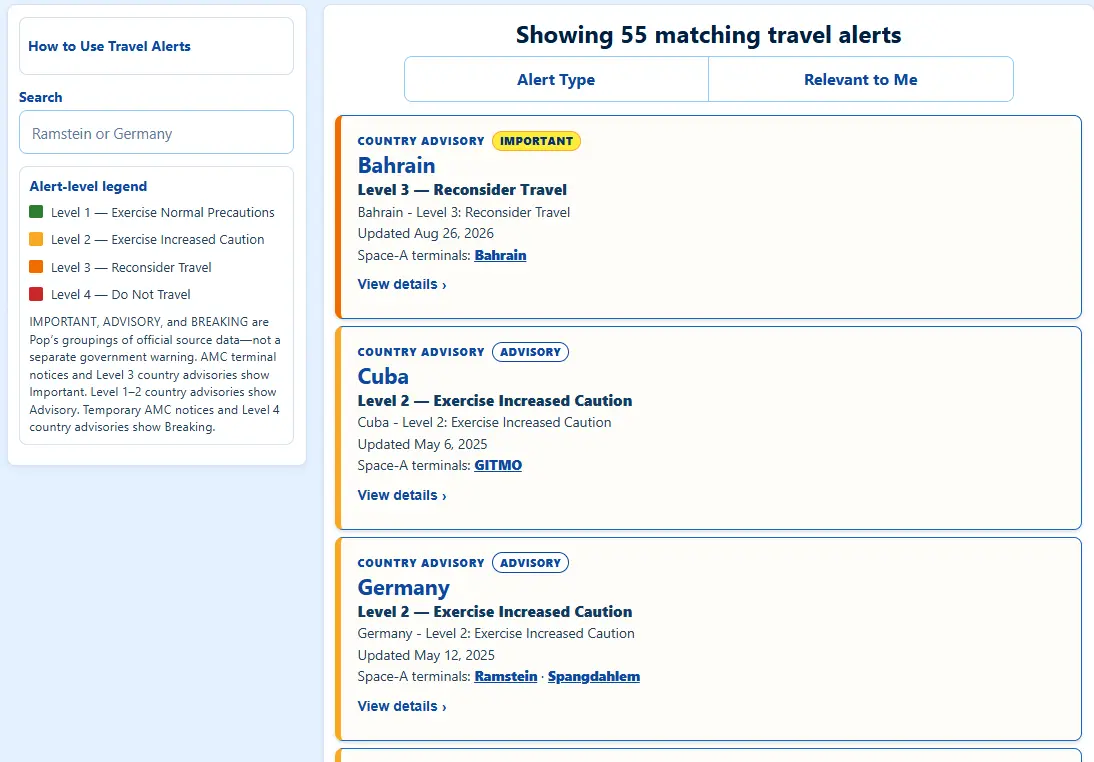
Travel Alerts list showing country advisories for Bahrain, Cuba, and Germany

What happened?

Space-A is difficult enough. Seats change. Missions move. A flight you were counting on can disappear overnight. Missing a critical U.S. State Department travel advisory can affect more than your plans. It can affect your safety.

That is why I put Travel Alerts on Pop’s Space-A. They pull together current terminal notices and official U.S. State Department country advisories that may affect a trip. You can browse them by country, by terminal, by flight, or by your favorites.

A quick distinction, because it matters: Travel Alerts are not the same as a 72-hour flight schedule. A schedule tells you what a terminal has published for upcoming missions. An alert is about conditions around the trip, such as a country advisory or a terminal notice. Both can change, and neither one is a seat.

Pop’s shows this for convenience. It is not an official AMC or State Department service, and it cannot replace the source. Stay informed, stay safe, and always check the official advisory and the terminal before you travel.

Take a look at Pop’s Travel Alerts: https://popsspacea.com/travel-alerts.html

Would this help you plan your next trip?

#SpaceA #MilitaryTravel #TravelAlerts #Veterans #AMCFlights

A Simpler Way to Prepare for Space-A Sign-Up

A Simpler Way to Prepare for Space-A Sign-Up

If you’re signing up by email at more than one Space-A terminal, you know the routine: find each terminal’s instructions, enter the same traveler information again, and send another message. Then you may be left wondering whether it arrived.

AMC offers an official Self-Sign-Up tool, and some travelers sign up by email. The terminal handles the registration, and its instructions are the ones to follow. AMC also warns that technical issues can affect email delivery and recommends keeping proof of your sign-up.

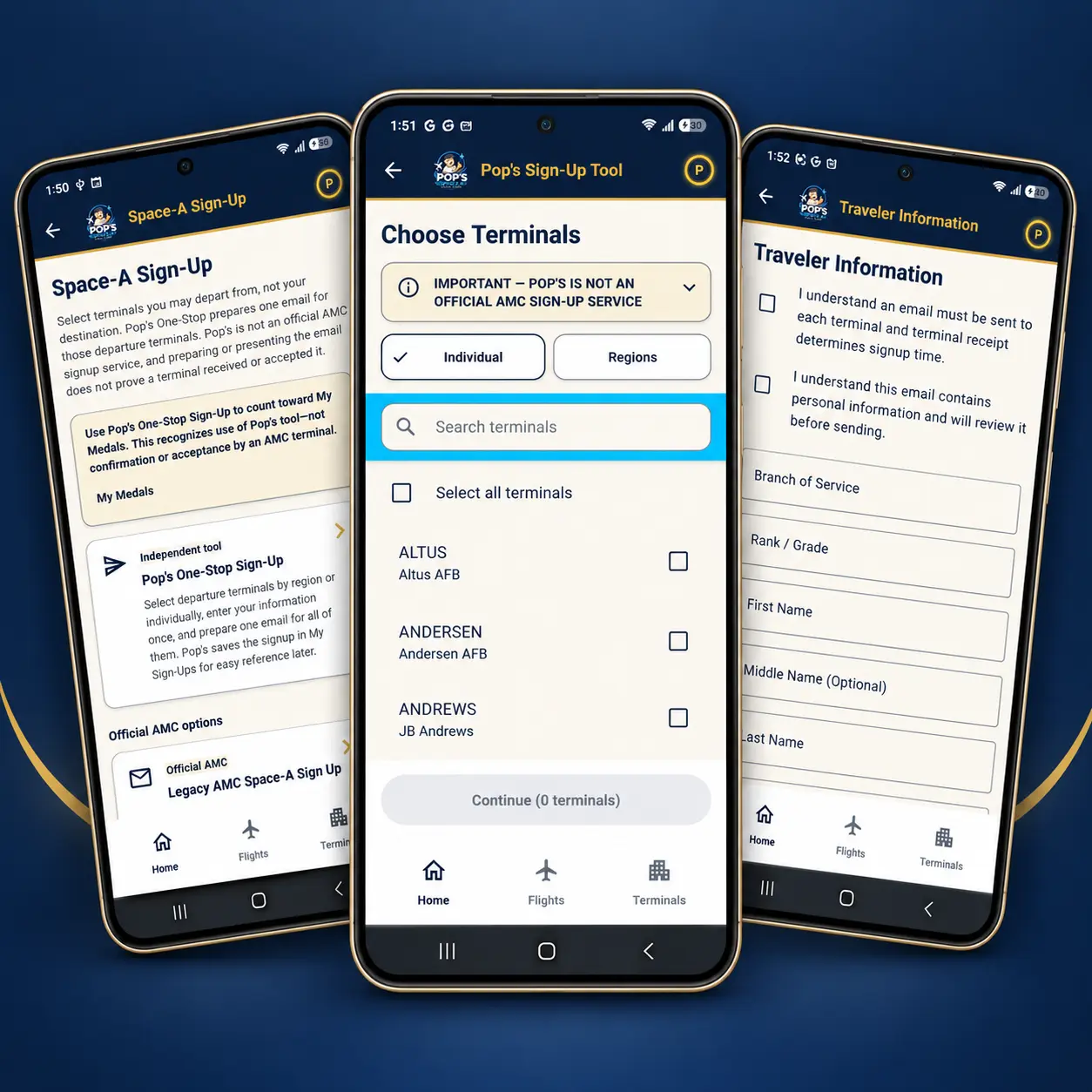
I wanted to make the email part less of a chore. With Pop’s One-Stop Sign-Up, choose the departure terminals you’re willing to use—individually or by region. If a terminal is included in more than one region, it only appears once. Enter your information once, and Pop’s prepares one email draft for the terminals you selected. Review it, then send it from your own email app. You can save the sign-up in My Sign-Ups for reference later.

A quick reminder: Pop’s prepares the email, but you’re the one who reviews and sends it. Keep a copy in your Sent folder, and check with the terminal if you’re unsure it arrived. The time the terminal receives your sign-up can affect your place on its list.

Pop’s One-Stop is an independent tool, not an official AMC service. It can make preparing an email easier, but it can’t confirm that a terminal received or accepted your sign-up. And no tool can promise a Space-A seat—availability depends on the mission and the space available. Follow the terminal’s current instructions before you travel.

🚨 The New Pop’s Space-A Flight Finder APP Has Landed!

The New Pop’s Space-A Flight Finder APP Has Landed

SPACE-A TRAVELERS, IT’S TIME TO TAKE A LOOK! ✈️

Meet the most comprehensive Space-A tool to date. Check out Pop’s updated website and new iOS and Android apps, packed with tools to help you explore flights and plan your next adventure.

Check out flight information, explore 200+ terminals, save flights and favorite terminals, follow routes and destinations, and copy, share, or print flight details. Use Pop’s One-Stop Space-A Sign-Up to prepare one signup email for as many terminals as you want—all in one go. Flight information updates every 10 minutes.

And here’s the best part: it’s FREE. No subscriptions and no Pop’s account. Saved flights, watches, and checklist marks stay in this browser or on the device. The website uses Google Analytics and ordinary hosting logs. Details are on the Privacy page.

Get started

The runway is open. Where are you hoping to go? 🛫

What “Space Available” Really Means

What “Space Available” Really Means
  • ✈️ What “Space Available” Really Means

One thing that confuses a lot of new travelers is the actual meaning behind “Space Available.”

Some people hear the name and assume:

  • 👉 “If there’s a seat, I’m getting on.”

Not exactly 😄

Here’s what it REALLY means:

Military missions always come first.

Always.

Cargo, aircraft requirements, and mission passengers have priority. AFTER those needs are handled, any remaining seats may be released to eligible travelers.

That’s why:

  • ✅ Seat counts change
  • ✅ Flights can disappear
  • ✅ Routes can shift
  • ✅ Delays happen unexpectedly

And honestly?

That unpredictability is part of the adventure.

Experienced Space-A travelers understand they’re flying on military missions — not commercial airline schedules.

The people who usually succeed with Space-A are the ones who:

  • ✅ Stay flexible
  • ✅ Watch multiple terminals
  • ✅ Build backup plans
  • ✅ Learn route patterns over time

One flight falling apart doesn’t mean the trip is ruined.

Sometimes it just means the adventure is starting differently than expected 😄

That’s exactly why tools matter.

At Pop’s Space-A Flight Finder, I try to make the process easier by giving travelers quick access to:

  • 🛫 Flight tracking
  • 🌎 Route maps
  • 📍 Nearby terminal tools
  • 📅 Schedule activity

No complicated accounts. No digging through paywalls. Just useful Space-A information.

Visit:

https://PopsSpaceA.com

What was the biggest surprise you discovered when you first learned how Space-A actually works?

#SpaceA #MilitaryTravel #AMCFlights #TravelTips #Veterans

How Retirees Can Fly Space-A Around the World

How Retirees Can Fly Space-A Around the World
  • 🌎 How Retirees Can Fly Space-A Around the World

One of the biggest misconceptions about Space-A travel is that it’s mostly for Active Duty travelers.

In reality, military retirees use Space-A every single day.

And some of them get REALLY good at it 😄

I’ve seen retirees use Space-A to:

  • 🇩🇪 Explore Europe
  • 🏝 Hop over to Hawaii
  • 🇯🇵 Visit Japan
  • 🇬🇺 Travel through Guam
  • 🇺🇸 Bounce around the U.S.

Now let’s be honest…

Space-A is not luxury travel.

Sometimes flights get delayed.

Sometimes routes change.

Sometimes you spend more time refreshing schedules than actually packing bags 😄

But retirees often have one HUGE advantage:

  • ✅ Flexibility

Travelers who aren’t locked into strict vacation windows usually have a much easier time making Space-A work.

The retirees who do best usually:

  • ✅ Watch schedules regularly
  • ✅ Learn terminal patterns
  • ✅ Stay flexible with destinations
  • ✅ Always have backup plans

That’s where experience starts paying off.

And honestly, once you begin understanding how routes and terminals behave, the whole system becomes a lot less intimidating.

That’s one reason I built Pop’s Space-A Flight Finder — to help simplify the process without forcing travelers through subscriptions, paywalls, or account signups just to access basic information.

Retirees can start with current Space-A flights, check AMC terminals, and see how hops connect on the Space-A route map.

At Pop’s you can:

Visit:

https://PopsSpaceA.com

Retirees — what has been your favorite Space-A destination so far?

#SpaceA #MilitaryTravel #Veterans #MilitaryRetiree #TravelTips

The #1 Most Underused Military Travel Benefit

The #1 Most Underused Military Travel Benefit
  • 🪖 The #1 Most Underused Military Travel Benefit

I honestly believe Space-A travel is one of the most underused benefits available to the military community.

Not because people don’t WANT to travel…

…but because most people assume:

  • ❌ It’s too complicated
  • ❌ Flights are impossible to catch
  • ❌ You have to “know somebody”
  • ❌ It only works for retirees living near huge bases

None of that is really true.

Now yes — Space-A definitely has a learning curve. The first time you look at an AMC schedule, it can feel like somebody handed you ancient military code written on a napkin 😄

But once you understand:

  • ✅ Roll calls
  • ✅ Categories
  • ✅ Schedule patterns
  • ✅ Backup planning

the whole system starts making a LOT more sense.

And the payoff can be incredible.

I’ve seen travelers use Space-A to:

  • 🌎 Explore Europe
  • 🏝 Reach Hawaii
  • 🇯🇵 Visit Japan
  • 💰 Save thousands on airfare

The travelers who succeed usually aren’t the luckiest…

They’re simply the ones who took the time to learn how the system works.

That’s one reason I built Pop’s Space-A Flight Finder — to help make Space-A easier to understand without burying basic information behind subscriptions, accounts, or login walls.

Just simple tools that help travelers:

  • 🛫 Track flights
  • 🌎 Understand routes
  • 📍 Find terminals
  • 📅 Monitor schedules

Visit:

https://PopsSpaceA.com

If you could catch a Space-A flight anywhere tomorrow, where would you go?

#SpaceA #MilitaryTravel #AMCFlights #Veterans #TravelTips

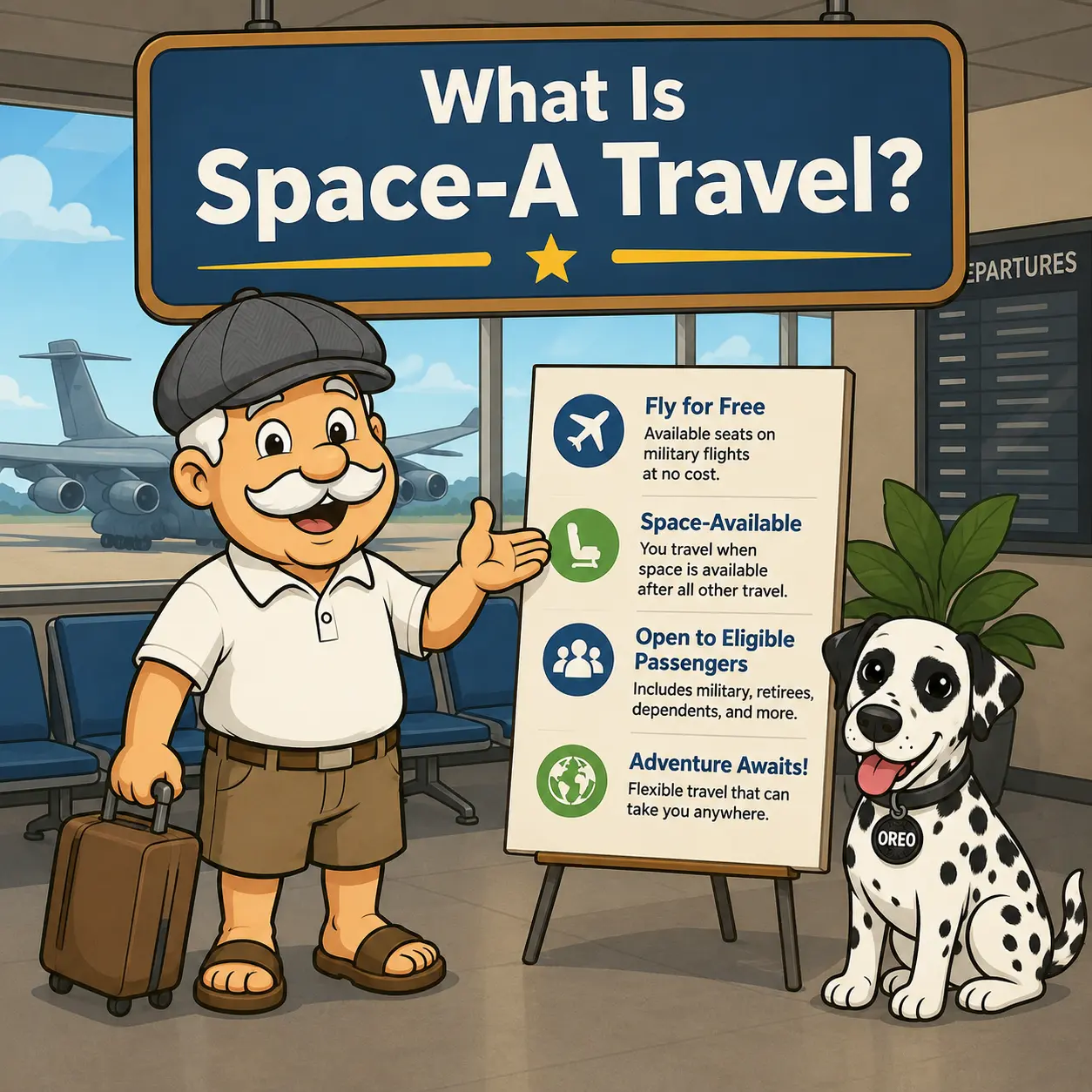
What Is Space-A Travel?

What Is Space-A Travel?
  • ✈️ What Is Space-A Travel?

One of the funniest things about Space-A travel is how many eligible people have heard of it… but never actually try it.

Usually because somebody told them:

  • ❌ “You’ll never get a seat.”
  • ❌ “It’s impossible to understand.”
  • ❌ “You’ll get stranded forever.”

Now don’t get me wrong — Space-A definitely requires patience and flexibility. This isn’t Delta Airlines 😄

But once you understand how the system works, it can open the door to some incredible travel opportunities.

Here’s the simple version:

Military aircraft fly missions all over the world every single day. After mission passengers and cargo are handled, any leftover seats may be released to eligible travelers.

That’s Space-A.

And those flights can sometimes take you to:

  • 🌎 Europe
  • 🏝 Hawaii
  • 🇯🇵 Japan
  • 🇬🇺 Guam
  • 🇺🇸 Locations across the U.S.

The travelers who do best are usually the ones who:

  • ✅ Stay flexible
  • ✅ Learn terminal patterns
  • ✅ Watch schedules regularly
  • ✅ Always have backup plans

One thing I always disliked about some Space-A resources was having to create accounts, log in, or dig through paywalls just to check basic information.

That’s part of why I built Pop’s Space-A Flight Finder — simple tools, easy access, no login required and FREE.

At Pop’s you can check current Space-A flights, browse AMC passenger terminals, review Space-A eligibility, and use the official AMC Space-A sign-up form.

At Pop’s you can:

What a Space-A Flight Finder Should Be

Pop asking for feedback on the Space-A flight finder

If you’ve ever tried to fly Space-A, you already know one thing: finding a flight shouldn’t be the hardest part of the trip—but somehow, it usually is.

You bounce between terminal pages, scroll through PDFs, check social posts that may or may not be current, and still end up asking yourself:

👉 “Is this even accurate?”

It doesn’t have to be this way.

One page. Real flights. Done.

A Space-A flight finder should be simple—not “simple once you figure it out,” not “simple after reading a guide.” Just simple.

You should be able to:

  • Open one page
  • See actual flights
  • Find where you want to go

No digging. No guessing. No second-guessing.

Accurate and actually updated

Space-A travel is unpredictable—that’s part of the deal. But the information you’re using shouldn’t be.

A good flight finder should:

  • Show real, reported flights
  • Update multiple times a day
  • Make it clear what’s current

Not something that was posted yesterday and is already outdated. If you’re making decisions based on bad data, you’re already behind.

No accounts. No paywalls. No nonsense.

You shouldn’t have to create an account, enter your email, or pay for “premium access” just to see flights. Space-A works because information is shared—putting that behind a login or a subscription defeats the entire purpose.

Built for people who actually fly

👉 The person who built it actually uses it.

Because if you’ve sat in a terminal refreshing updates, you know what matters: speed, clarity, no clutter, no wasted time. You don’t need fluff—you need answers.

Less stress, not more

Space-A already comes with enough uncertainty: Will there be seats? Will the flight leave? Will you get bumped? The tool you use should reduce stress—not add to it.

That means a clean layout, easy navigation, and no distractions—just the information you need, when you need it.

A little personality doesn’t hurt

This isn’t just data—it’s travel, it’s experiences, it’s getting somewhere important. A little humor, a human voice, and something that reminds you there’s a real person behind it makes a difference. Because there is.

The standard we should expect

A Space-A flight finder should be simple, accurate, updated often, easy to use, free, and built by someone who actually uses it. That’s not a wishlist—that’s the baseline.

Final thought

Space-A travel will never be perfect—but finding your next flight should be the easy part.

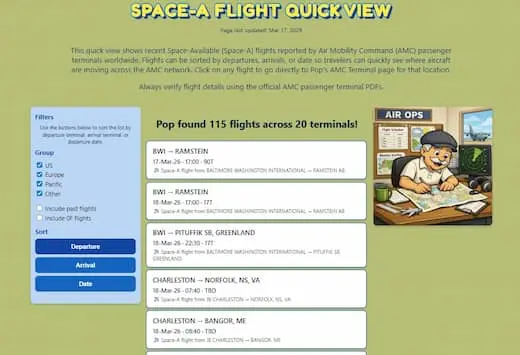
That’s why Quick View, AMC Terminals, and the Route Map are here: one place to see what’s moving, without the runaround.
Seeing Space-A as a Network, Not Just Individual Schedules

Route Map view highlighting Ramstein as a major Space-A hub

Space-A travel can be difficult to understand when you’re looking at individual terminal schedules. Each location only shows a small piece of the puzzle, making it hard to see how flights actually connect. The Route Map brings everything together into a single view, helping you quickly understand how the network is moving.

In this example, Ramstein stands out as a major hub. You can clearly see multiple routes crossing the Atlantic from the U.S., along with connections spreading throughout Europe and into other regions. Instead of checking several terminals and trying to track flights manually, the map lets you see those relationships instantly.

This bigger-picture view makes it easier to plan flexible travel. Rather than focusing on one specific destination, you can identify high-traffic hubs, spot alternate routes, and adjust your plan based on real activity. It turns scattered schedule data into something you can actually use.

Explore the Route Map to see how the Space-A network is moving right now.

Pop waving, Space-A flight finder mascot

Pop's Introduction

I’m a retired Navy traveler who built this site because Space-A info is scattered, confusing, and buried in PDFs.

There used to be some great Space-A tools—but most are gone. While there are still great communities, I couldn’t find anything that pulls flight activity and terminal info together in one place the way this site does.

So that’s what I built. Pop's Space-A Flight Finder helps you quickly see flights, terminals, and patterns so you can make better decisions without all the guesswork.

It’s not official—and Space-A is still unpredictable—but if this gives you a better shot at getting where you want to go, it’s doing its job. Jump in, browse around, and let me know how we’re doing.

— Pop

Space-A snapshot – mid March 2026

Card-style collage showing AMC terminals, Quick View, route map, closest terminal, and Dover AFB

AMC passenger terminals are still seeing healthy movement across CONUS–Europe and CONUS–Pacific routes, but schedules remain tentative and can shift quickly. Always treat the 72‑hour sheets as a planning tool, not a promise.

If you’re new to the site, start with Quick View to see potential Space Available flights, then jump into AMC Terminals to drill into more detailed flight information, contact info, and official schedule links for each terminal.

Welcome to Pop’s Space-A Flight Finder

Pop and Oreo preparing for a Space-A trip.

Welcome aboard.

I’m Pop—a retired Navy veteran and longtime Space-A traveler. Along for the ride is Oreo, my Dalmatian and the four-legged copilot behind our “Oreo Express” mascot.

I built this because planning a Space-A trip should not mean hunting through dozens of websites, social pages, and scattered terminal PDFs just to see where flights might be going.

There used to be several good Space-A tools. Most of them are gone. Helpful communities still exist, and official AMC passenger terminal pages still matter. I could not find one simple place that brought flight activity, terminal information, and planning tools together.

If you earned this benefit through your service, you should not have to pay again just to use it. That is why Pop’s is free—no subscriptions, no required login, and no hassle.

Here you can explore Space-A flights, review passenger terminal information, check 72-hour schedules, compare recent flight activity, and look at common routes. The goal is simple: less time searching, more time deciding.

You can also find nearby military passenger terminals, keep flights and routes on your device, watch destinations, review travel alerts, and learn how Space-A works.

If Pop and Oreo can make Space-A a little easier to understand—and give you a better shot at getting where you want to go—then we are doing our job.

Look around, try the tools, and if you want something added—or you see something we can square away—use the Feedback form. This was built for you and the rest of the Space-A community.

Carry on.

— Pop & Oreo

Pop’s complete Space-A travel guide

Military Space-Available travel works when leftover seats remain after the mission is filled. Pop’s Space-A Flight Finder is an unofficial planning site that gathers Space-A flight schedules, AMC passenger terminal pages, Space-A route planning, and a Before You Travel checklist in one place.

Start with Quick View for recently published departures and arrivals, then open the matching AMC passenger terminal page to verify the official 72-hour flight schedule. Use One-Stop Sign-Up only as a helper that prepares email in your own app—it is not AMC signup itself.

Review Space-A eligibility before you plan, keep backup travel options, and treat every seat count as tentative. This guide does not replace official AMC, State Department, or terminal instructions.